Build a query, with examples
You know what you want to find out. What you do not know yet is whether the words you typed and the query that comes back mean the same thing. Most bad results start there, not in the GraphQL.
This page gives you a way to approach any question, then examples you can paste into the editor on the Query page. Read Ask a question with Query first if you have not opened the page yet.
Picture the table first
Query always gives you a table. So before you type anything, picture that table and make four decisions. Whether you ask in plain words or write GraphQL, these are the same four decisions.
1. What is one row?
This is the decision that matters most, because it picks where the query starts.
| You want | One row is | Start from |
|---|---|---|
| A number, split by severity or type | One combination of type, severity and status | findingCounts |
| Problems to act on | A finding | findings |
| What you own, and its state | A resource | resources |
| A package or library, and who uses it | A component | components |
| Everything affected by one CVE | A finding with that vulnerability id | findings with vulnId |
| Whether things are getting better | A day, per type and severity | postureTrend |
If you cannot say what one row is, your question is probably two questions. Ask them one at a time.
2. Which rows?
Each condition you care about should become a filter. These are the words that trip people up, because the console means something exact by them.
| When you mean | Filter on | Good to know |
|---|---|---|
| Still a problem | statuses: [OPEN] | This leaves out waived findings, because the status is the effective one. |
| How bad | severities: [CRITICAL, HIGH] | This filters on the effective severity, so a person's override counts. |
| Found since a date | firstSeenAfter | Dates are UTC, such as "2026-10-01T00:00:00Z". |
| Found by one run only so far | lifecycles: [NEW] | "New" is narrower than "recent". Use firstSeenAfter for "this month". |
| Accepted risk or false positive | lifecycles: [WAIVED] | Add waiver { reason expiresAt } as columns. |
| Left out by a Finding Configurations category | statuses: [IGNORED] | Ignored findings never appear unless you name them. |
| Older commits or image digests | current: false | Without this, you get only the versions your tracked refs point at now. |
| One kind of finding | types: [SECRET] | The schema lists every type. |
| One kind of resource | resourceTypes: ["code"] | On findings. On resources the filter is type: "code". |
Do not filter on an organization. The selector at the top of the page already decides that, and nothing in a query can change it.
3. Which columns?
Choose what a person would need in order to act on the row: a name, a severity, a date, a fix. A plain field costs nothing, so add the one you will want. A nested object such as resource { name } becomes a dotted column, resource.name, and adds to the price.
Use severityEffective as your severity column, not severity. severity is what the pipeline assigned, and it can disagree with the filter you just wrote when someone has overridden it.
4. How many?
Always say. A page holds at most 200 rows, and a list without first returns 50. Start small. Twenty five rows are enough to tell you whether the query is right, and you can raise the number once it is.
Say it in plain words
When you ask Dwaar, put those four decisions in the sentence. It will fill in whatever you leave out and tell you what it assumed, but you will spend your time correcting assumptions.
| Instead of | Try | What you added |
|---|---|---|
| Show me our problems | Open critical and high findings, worst first, with the fix and the resource | The row, the filters, the order, the columns |
| Any new secrets? | Open secrets first seen since October 1 | An exact meaning for "new" |
| log4j | Which log4j versions do we use, and how many resources use each? | The row and what to count |
| Are we getting better? | Open and fixed vulnerabilities per day for the last 30 days | The time window and the columns |
| Is everything fine? | How many open findings of each type and severity do we have? | Something a table can answer |
A few habits help:
- Use the console's words. Finding, resource, component, waived and ignored all mean something exact in the glossary.
- Say how many rows you want. Dwaar asks for 25 unless you say otherwise.
- Ask for one thing. Dwaar writes one top level list unless your question really compares two.
- Ask for a comparison outright. Say "compare open and fixed secrets" and you get two tables to switch between.
If the schema does not hold what you asked for, Dwaar should tell you so instead of writing something close. Its reason usually names what is missing, and its suggestions are the closest questions it can answer.
Check it before you trust it
The query can be valid and still be wrong, so read it once, in this order.
- Read Understood as. Does the sentence describe your question? If it describes a nearby one, the query answers that nearby one.
- Read the assumptions. Each one is something you did not say. "Current versions only" is often right, and sometimes it is exactly why your number looks low.
- Read the
filter. You do not need to know GraphQL to comparestatuses: [OPEN]with what you meant. - Compare one number. Run a count you can also see on the Findings page. When the two match, you can trust the shape of the query.
Improve it
Use the cheapest tool that makes the change.
| To change | Do this | Why |
|---|---|---|
| A number, a date, a field or a severity | Edit the query by hand | The check is free, you see any problem straight away, and no model is involved. |
| What the question means | Ask a follow up, such as "only the critical ones" | Dwaar changes the query on screen instead of starting over. |
| A query that reads too much | Lower first, add a filter, or remove a nested object | Those are what its price is made of. |
| A query that refuses to run | Read the line and column under the editor | The message names the field or limit it tripped over. |
When a query is right, choose Star. It stays at the top of History, ready to load without running.
Examples
Each of these passes the check on the current schema, and the price is the most it can cost at the page size shown. The Query page does not show prices, so use these to plan. Paste one into the editor and change the values. If you ask Dwaar the same question, it can write the query differently, so read what it wrote.
How many open findings do we have?
Up to 1 unit. Start here when you want numbers, because it reads no pages of rows.
query {
  findingCounts(filter: { current: true, statuses: [OPEN] }) {
    type
    severity
    count
  }
}
You get one row per combination of what you select, so add up the rows you care about.
What should we fix first?
Up to 3 units. The worst open findings, with what you need in order to decide.
query {
  findings(
    filter: { severities: [CRITICAL, HIGH], statuses: [OPEN] }
    orderBy: SEVERITY
    first: 50
  ) {
    nodes {
      title
      severityEffective
      vulnId
      fix
      epss { score }
      kev { ransomware }
      resource { name }
    }
  }
}
An empty epss or kev cell means the vulnerability is not listed, or that those feeds are off for your console. It does not mean the vulnerability is safe.
What did we find this month?
Up to 2 units. Change the date. It is in UTC.
query {
  findings(
    filter: { statuses: [OPEN], firstSeenAfter: "2026-10-01T00:00:00Z" }
    orderBy: FIRST_SEEN
    first: 50
  ) {
    nodes {
      title
      severityEffective
      firstSeenAt
      resource { name }
    }
  }
}
Where are we affected by this CVE?
Up to 6 units. The filter takes any vulnerability id, so swap in the one you are chasing.
query {
  findings(filter: { vulnId: "CVE-2021-44228" }, first: 100) {
    nodes {
      lifecycle
      subject { purl path }
      version { ref short }
      resource { name type }
      fix
    }
  }
}
Do we have critical secrets in public repositories?
Up to 5 units. This one teaches a limit: you can filter findings by resource type, but not by a resource's visibility. So filter on what the schema allows, and bring visibility in as a column to read.
query {
  findings(
    filter: { types: [SECRET], severities: [CRITICAL], statuses: [OPEN], resourceTypes: ["code"] }
    first: 100
  ) {
    nodes {
      title
      subject { path line }
      resource { name visibility }
    }
  }
}
Which repositories have open critical findings?
Up to 2 units. The row here is a resource, with one number on it. first: 1 keeps the price down, and totalCount gives the count.
query {
  resources(filter: { type: "code" }, first: 25) {
    nodes {
      name
      visibility
      findings(filter: { severities: [CRITICAL], statuses: [OPEN] }, first: 1) {
        totalCount
      }
    }
  }
}
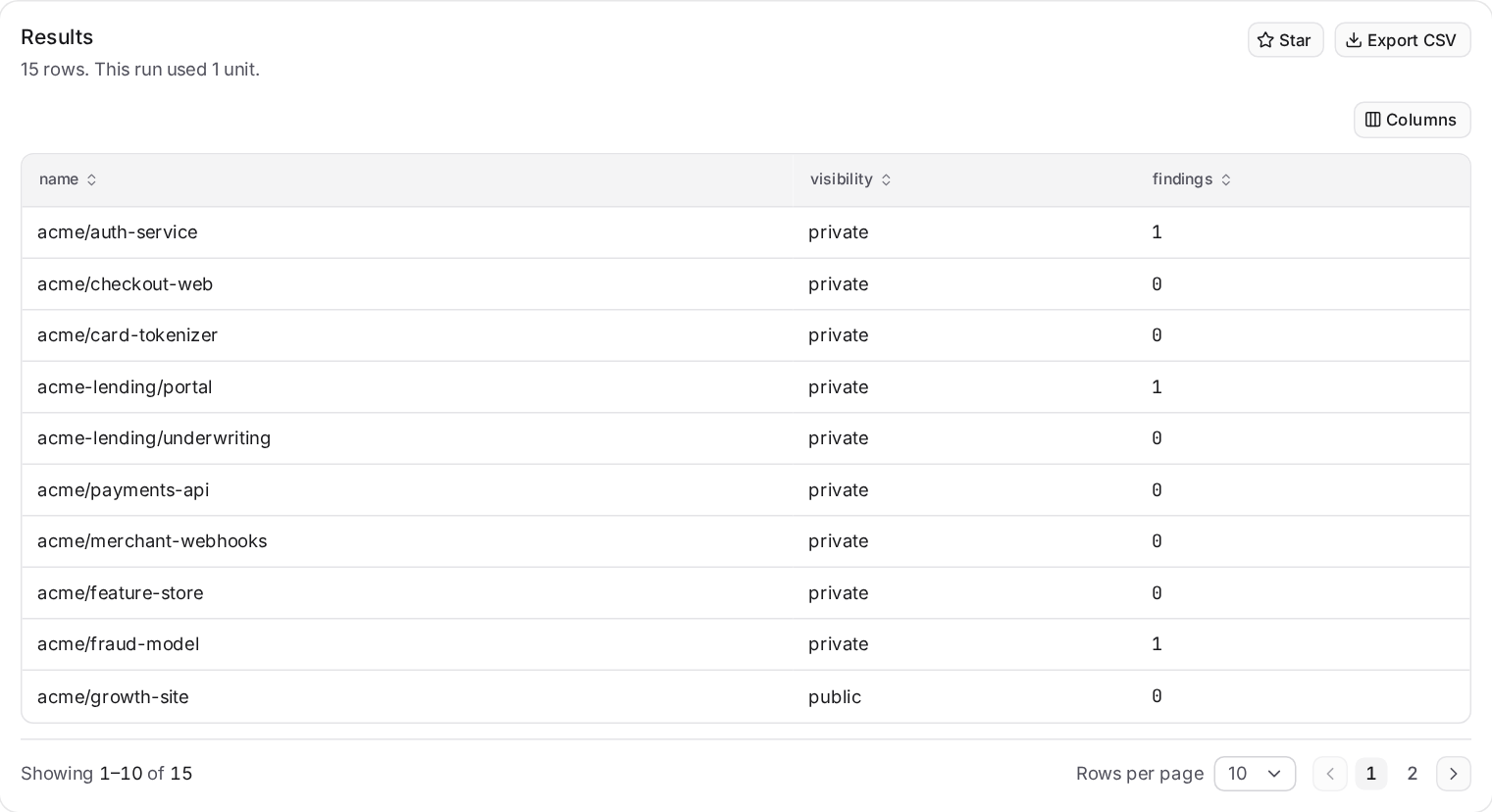
What have we accepted, and why?
Up to 3 units. Useful before an audit, because the reason and the expiry sit beside each finding.
query {
  findings(filter: { lifecycles: [WAIVED] }, first: 50) {
    nodes {
      title
      waiver { kind reason expiresAt }
      resource { name }
    }
  }
}
What is reachable from the internet?
Up to 2 units. The exposure values are listed on ResourceFilter in the schema.
query {
  resources(
    filter: { type: "cloud", exposure: ["public_url", "public_ip", "internet_lb"] }
    first: 50
  ) {
    nodes {
      name
      kind
      region
      exposure
      lastScanAt
    }
  }
}
Which versions of this package do we use?
Up to 2 units. A text search adds to the price, and usedBy shows as a count of resources.
query {
  components(filter: { search: "log4j" }, first: 10) {
    nodes {
      name
      version
      purlType
      usedBy(first: 10) { totalCount }
    }
  }
}
Are we getting better?
Up to 1 unit. You get one row per day, type, severity and resource type, oldest first, for at most 400 days. There is no pager, so export it or narrow the filter if it is too long to read.
query {
  postureTrend(days: 30, filter: { types: [VULNERABILITY] }) {
    day
    severity
    open
    new
    fixed
  }
}
Compare two sets side by side
Up to 2 units. Two top level lists give you two tables and a switch between them. The names in front of each list are aliases, and they become the labels on that switch.
query {
  stillOpen: findings(filter: { types: [SECRET], statuses: [OPEN] }, first: 25) {
    nodes { title severityEffective resource { name } }
  }
  fixed: findings(filter: { types: [SECRET], statuses: [FIXED] }, first: 25) {
    nodes { title fixedAt resource { name } }
  }
}
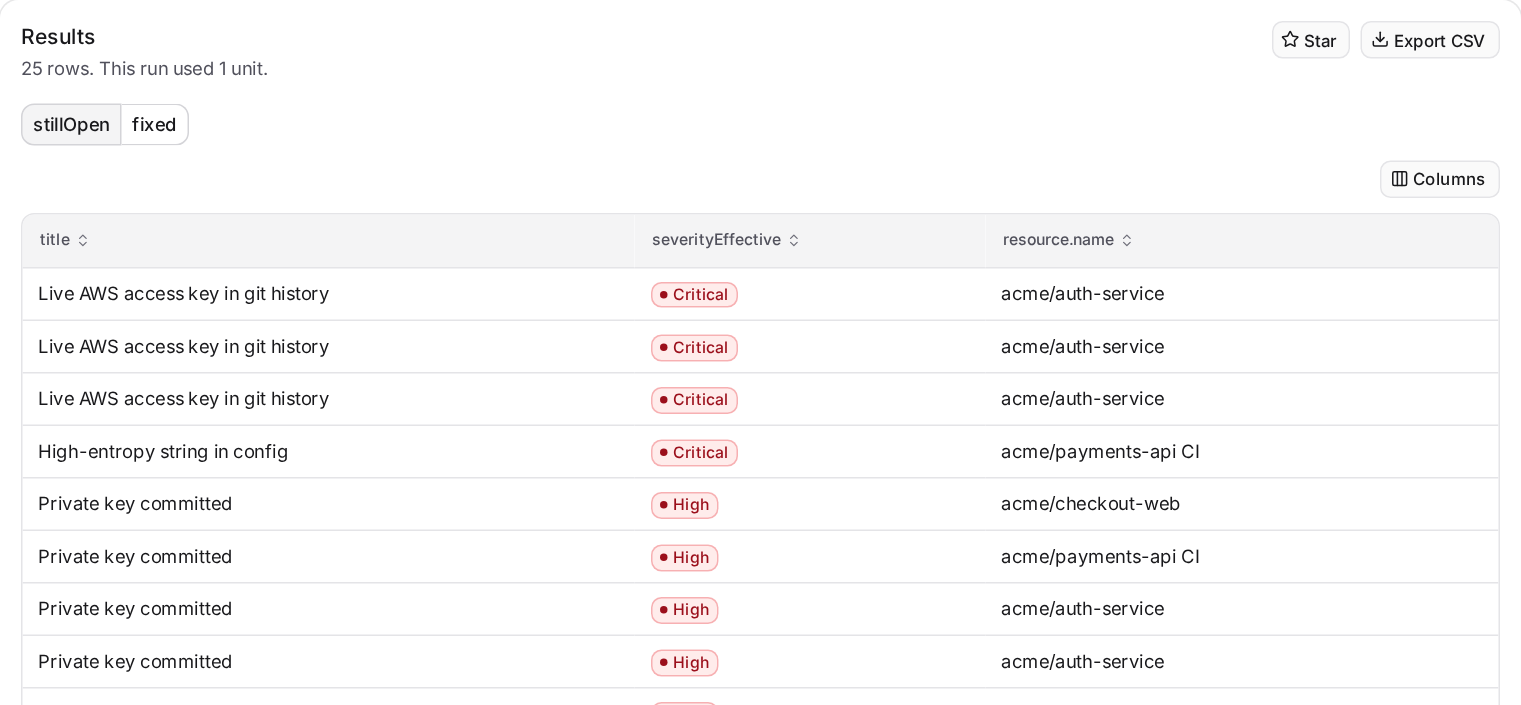
The price counts both lists, and a query with two lists has no pager. Use it to compare, then go back to one list when you need to walk through the rows.
What most people get wrong
| What you see | What is going on | What to do |
|---|---|---|
| The count is lower than you expected | Ignored findings and older versions are left out by default. | Add current: false, or name IGNORED. |
| No rows, on data you know exists | The organization selector, or your own access, narrows every query. | Check the selector at the top of the page, then the filter. No rows costs 1 unit. |
| A nested column holds a small number where you expected a list | A nested list shows as its size, not as more rows. | Start from the nested thing instead. For a resource's findings, query findings with resourceIds. |
findingCounts under a resource shows 1 or 2 | That is the number of cells in the list, not the number of findings. | Use findings(first: 1) { totalCount } as in the repositories example. |
| A column disagrees with your severity filter | severity is the pipeline's value, and the filter uses the effective one. | Select severityEffective. |
| "exceeds the limit of 2000" | A list inside a list multiplies. 50 components with 50 findings each comes to over 5000. | Lower both first values, or ask for a count instead of the inner rows. |
| The field does not exist | The schema has no products, grades, guards, exceptions or members yet. | Use what it has. The schema is the full list. |
When Query is not the tool
Query is for questions you are still working out. Use something else once the question has settled.
- Every finding, as a file. Export CSV on Query takes one page. Export from Findings takes the whole filtered list.
- The same query every day from a script. Send it to the GraphQL API with an API key.
- What a result means. Query does not read its own results. Open the finding and ask the assistant.
Try this next
Think of the last question someone asked you that took more than a few minutes to answer. Write down what one row would be, then ask it in one sentence with the filters and columns in it. Check the answer against a page you trust, and star it. That is one question you will never have to work out again.