Ask a question with Query
Your manager wants to know how many open secrets you have, and the Findings filters are one column short of the answer. Query takes the question in plain words, writes a read-only GraphQL query for it, and shows you that query before you trust the rows.
You need query:run to run a query and ai:use as well to ask in plain words. Administrator, Security admin, AppSec engineer and Developer hold both by default. Other built-in roles hold neither, so give those people a custom role if they need this page.
Ask a question
- Open Query in the rail. You land on the Data tab.
- Type your question in the box, or pick a recommendation from the tile beside the query.
- Choose Fast or Deep if you see the choice. Deep is the Reasoning tier, and it only appears when your administrator offers that tier.
- Choose Ask.
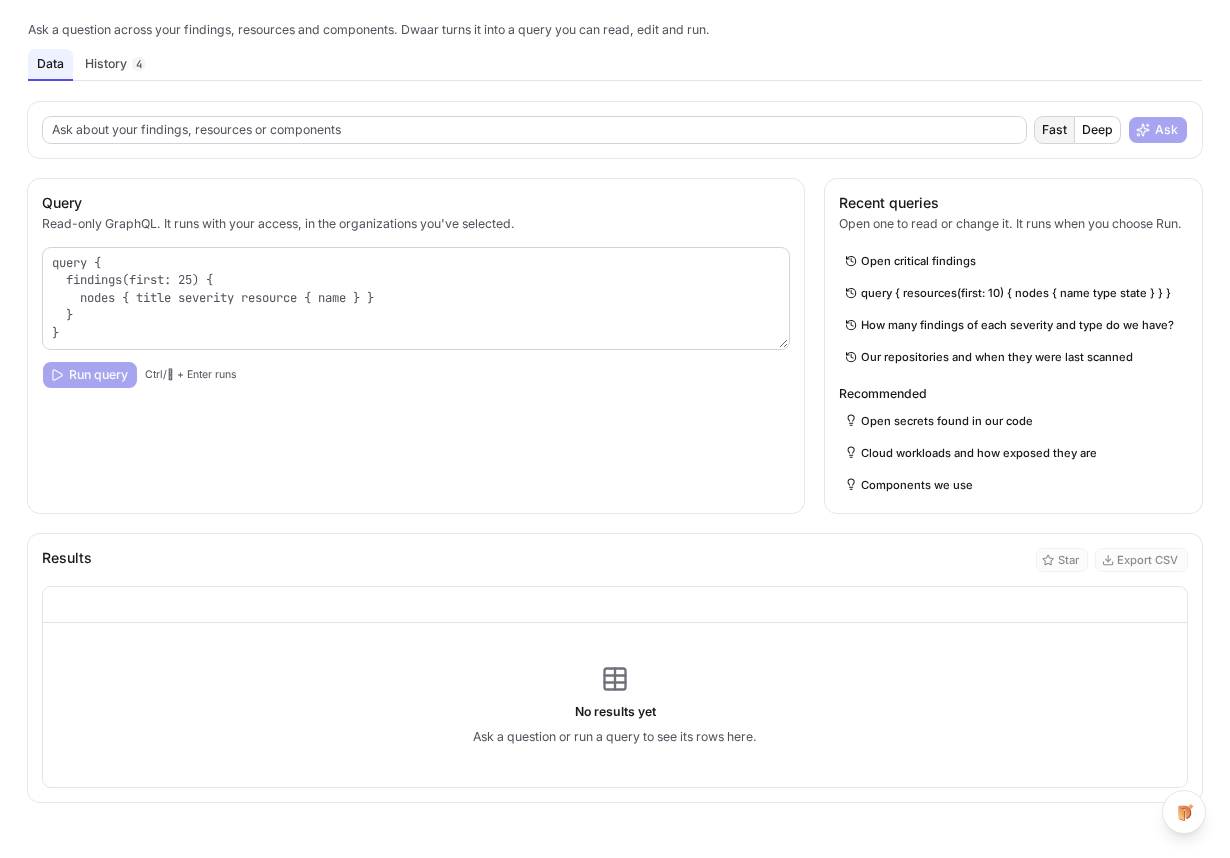
The recommendations are worth a click even if you have a question of your own. They show the kind of thing Query can answer, and each one is a working query you can edit. Recent queries sit above them. Opening one loads it into the editor and does not run it. For how to word your own question, and examples to copy, read Build a query, with examples.
What you should see
Dwaar answers in one of three ways.
| Answer | What it means | What to do |
|---|---|---|
| Understood as, beside the query | Dwaar wrote a query and the console validated it. | Read it. A cheap query has already run. A costlier one waits for you to choose Run query. |
| A question back, with options | Your question could mean several things. | Pick an option, or ask again with more detail. |
| Dwaar can't build a query for this | The data is not in the schema, or the question is not about this data. | Read the reason, and try one of the questions it suggests. |
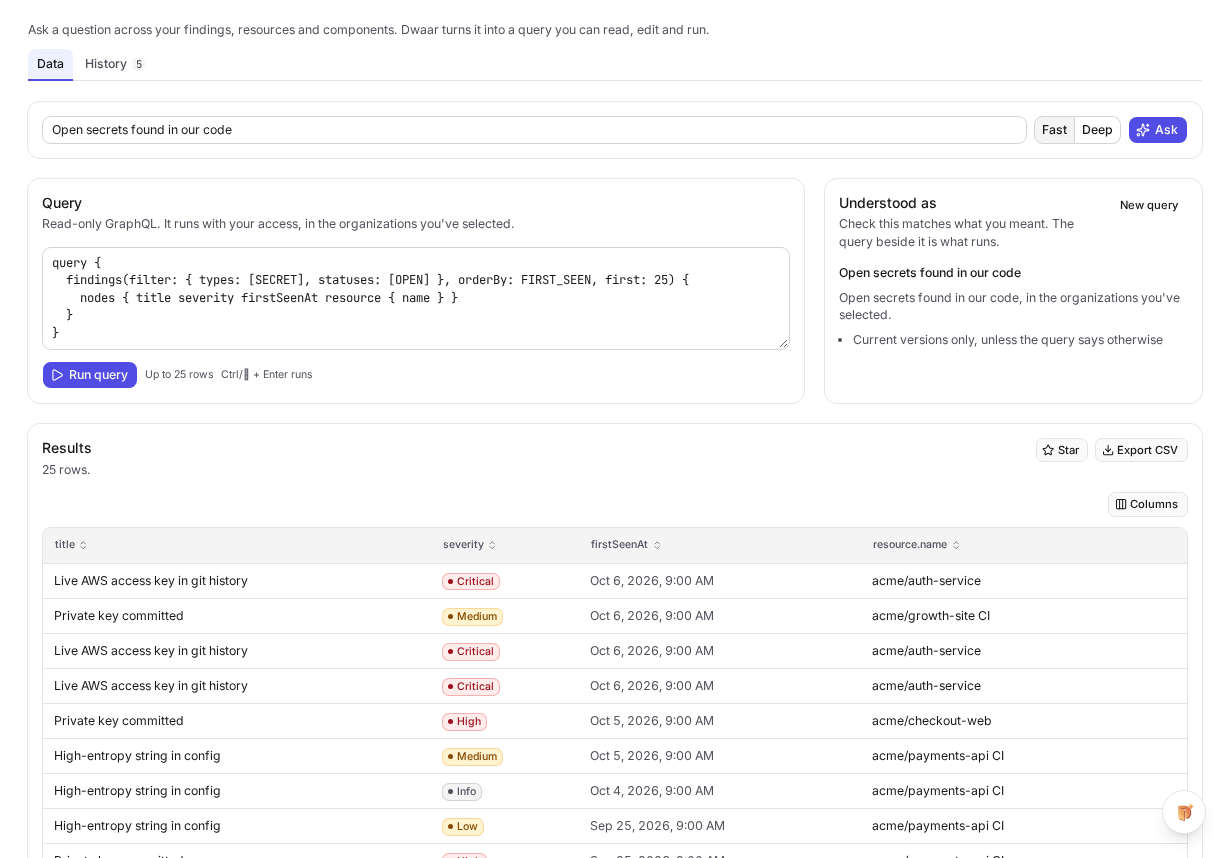
Do not skip Understood as. A query can be perfectly valid and still answer a different question from the one in your head, and Dwaar cannot see your data to notice. Any assumption it made is listed there, so check those first. The query is what runs, not the sentence. When you write, edit or reopen a query yourself, the same tile lists what the run read once it has run. Choose New query to clear the page and get recent queries and recommendations back.
A question the schema cannot answer spends nothing and runs nothing.

Follow up
Once Dwaar has written a query, your next question builds on it. Ask for "only the critical ones" and Dwaar changes the query on screen instead of starting again. If you edited it first, your edited version is the one it changes.
What you can ask about
Query reads the same schema as the GraphQL API: findings and their counts, resources, components, one vulnerability across your tenant, the posture trend, and a resource's scans.
You cannot query products, grades, guards and policies, exceptions or members yet. You can read a finding's KEV entry, but you cannot filter on it. Ask for any of these and you get the reason, not a guess.
Results follow the same rule as the rest of the console: you see what your access allows, in the organizations selected at the top of the page. Your tenant and your organizations never come from the query, so neither you nor Dwaar can write one that reaches further.
Building a query sends the model your question, the schema and its limits, plus the query you are following up on. It never sends your findings, your organization names or a result. Dwaar reads no rows to write the query, and it does not read the rows that come back.
Write or edit the query yourself
The box under Query is an editor, and you do not need Dwaar AI to use it. When Dwaar AI is off or you do not hold ai:use, the question box is gone, a recommendation goes straight into the editor, and every query you write still runs.
query {
  findings(first: 200) {
    nodes { title severity resource { name } }
  }
}
A moment after you stop typing, the console checks the query. The check reads nothing and costs nothing.
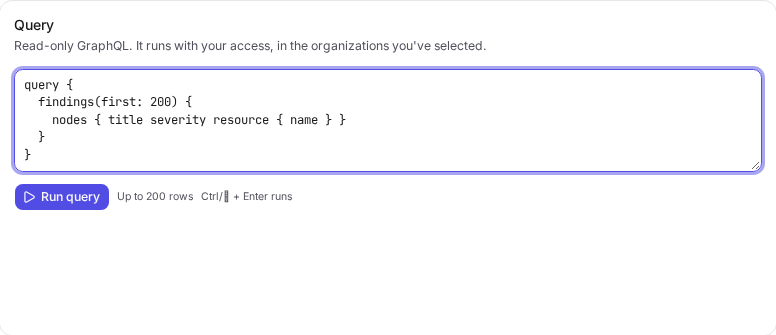
If the query cannot run, the editor names the line and column, and Run query stays off until you fix it. Choose Run query or press Ctrl or ⌘ with Enter.
These limits apply however a query was written:
| Limit | Value |
|---|---|
| Operations | One query at a time. No mutations, and no schema introspection. |
| Depth | 6 levels. |
| Rows | 200 a page. A list without first returns 50. |
| Complexity | A budget of 2000, which is 20 units. |
| Time | 15 seconds for a run. |
| Result size | 5 MB. A larger result is refused, not cut short. |
The complexity budget is what stops you nesting one list inside another. 200 findings with 200 components each costs far more than 2000, and the check refuses it. When you want a number, use findingCounts instead of a page of rows to count.
Read the results
You get one column per field you selected, named by its path, such as resource.name. A severity gets its badge and a date is formatted. A nested list shows as a count, not as more rows. If the query asks for several things at its top level, you switch between them above the table.
Only a query with a single top level list has a pager, and it moves one page at a time. Every page is a run and is charged like one, and so is changing Rows per page. Set the page size you want before you walk through a long result. The pager ignores clicks while a run is in flight, so wait for the rows.
Export CSV downloads the page on screen and costs nothing more. There is no export of the whole result yet.
If you see Part of this query couldn't be read, some of the fields needed a permission you do not hold. The rest came back, and you pay for those rows.
What a query costs
Query units measure what a query reads from the database. One unit is about 100 rows, and one query costs at most 20.
You are charged for what a query actually read, and never more than its price, which is the most it can read. A query with no rows costs 1 unit.
The Query page does not show units. To judge a query before you run it, use the note beside Run query, which says how many rows it can return. More rows and more nested objects cost more: the 200 row example above can cost up to 7 units. Your tenant's query units and custom queries for today and this month are on Settings › Usage, which needs billing:read, so ask your administrator if you do not hold it.
| Costs units | Costs nothing |
|---|---|
| A query that returns rows, even if part of it could not be read | The check as you type |
| A query that returns nothing: 1 unit | A query that fails or times out |
| Each further page, or a new page size | Opening a query from Recent queries or History |
| A call to the GraphQL API with an API key | Export CSV of the page on screen |
Asking a question costs no units either, because units only measure reads. The model's calls count as AI usage instead, so they fall under Dwaar AI settings. The two are counted separately: with Dwaar AI off you can still run queries, and with units past their limit you can still ask.
Selecting one more plain field is free. Text search adds to the price, and so does each nested object, because those are what make the database work harder.
A built query over 10 units waits for you to choose Run query. An administrator can set a limit on query units, and that limit warns without stopping anything.
Find a query again
The History tab keeps every query you ran that returned a result. It holds only your own queries, and nobody else in your tenant can see them.
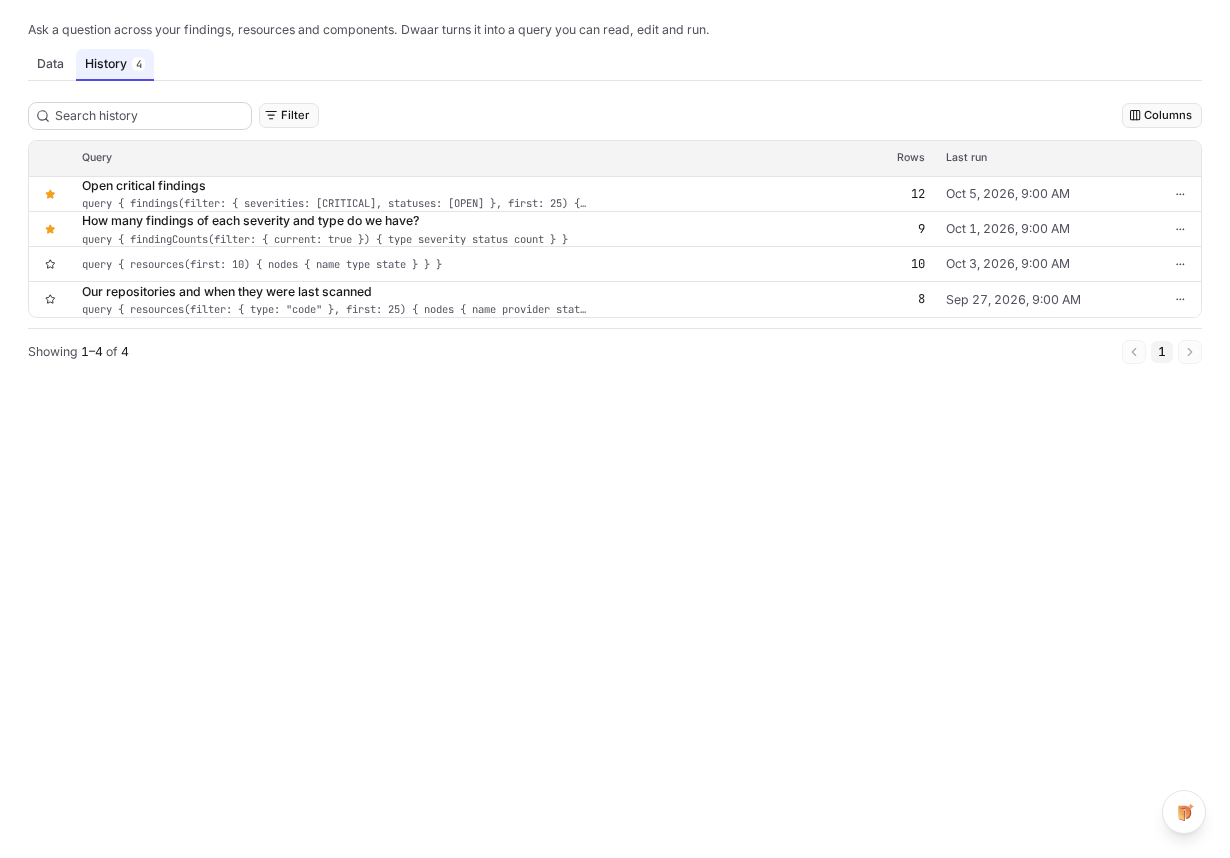
- One entry per query. Running the same text again updates its entry. Rows shows the last run.
- Star what you reuse. Starred queries sort first, and Filter can show only those. You can also star a query from Results.
- Opening is free. Choosing a row loads it into the editor and does not run it, so choose Run query when you want fresh rows. The same goes for a link to a history entry.
- Clean up from the row menu. It has Copy query, Archive and Delete. An archived query stays hidden until Filter asks for it. Deleting takes the text out of history, while the units it spent stay counted for the month.
History stores the question and the query, never the rows.
Try this next
Ask a question about your own data that you would normally answer with an export. Read Understood as, then change one filter in the query by hand and choose Run query. Star the version you keep, and you will not need that export next month.