Bind connections
An outpost that is online does nothing on its own. Work goes to it one connection at a time: you bind a connection, and from then on its discovery, connection tests and scans run on that outpost. Everything else about the connection stays the same.
Prerequisites
- An outpost that is Online. See Deploy an outpost.
- A Dwaar role that holds
integrations:createto connect a provider, orintegrations:updateto change an existing connection, andoutposts:readto see the outposts in the picker.
Bind a new connection
- Open Integrations and choose the provider.
- Fill in the connection as usual. Under Where it runs, set Runs on to the outpost. The connect form offers outposts that are Online or have just enrolled, because the check runs there at once. Choose a deployment says how to pick one.
- If Dwaar must never call the provider itself, turn on Only reachable from the outpost. See below.
- Press Test connection. The test runs on the outpost, so it proves the outpost can reach the provider with these credentials. An outpost that is stopping refuses it with "the outpost
is stopping; try again when it is back": wait for it to be Online and press it again. - Finish the discovery step and save. The first discovery runs on the outpost.
Bind or move an existing connection
Open the connection's Connection tab and find Where it runs.
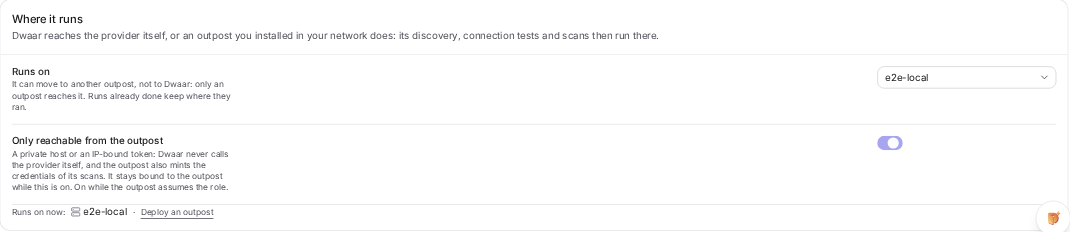
- Change Runs on to an outpost to bind it, to another outpost to move it, or to Dwaar to bring it back. Here the picker lists every outpost that is not revoked, with its status after the name when it is not online, so you can bind to one that is down for maintenance.
- Runs on now names where its work goes from here on.
Changing Runs on does not test the credential again, so press Test connection afterwards. Work that has not started yet goes to the new place. Runs that already started or finished keep where they ran: the queue still says where each one happened.
The change is recorded in the audit log as a connection update, with the outpost before and after, and in the connection's activity as "Settings changed: outpost".
Only reachable from the outpost
Binding sends the work to the outpost, but Dwaar could still call the provider itself if it had to. Only reachable from the outpost takes that away. Turn it on when:
- the provider has a private address that Dwaar cannot reach anyway, or
- the token is bound to your IP addresses, so a call from Dwaar would fail or, worse, trip an alert.
With it on, Dwaar never calls the provider: every test, preview and discovery is an outpost job, and the outpost also mints the credentials each scan needs. The connection stays bound to an outpost while it is on, so you can move it to another outpost but not back to Dwaar. Turn it off first if you want that.
AWS connections the outpost assumes
An AWS connection has a field Dwaar's own connections do not need: Role assumed by.
| Choice | Who assumes the role | What the trust policy names |
|---|---|---|
| Dwaar | Dwaar's account, with your external id | Dwaar's principal |
| An outpost | The outpost, with its own AWS identity and your external id | The outpost's role in your account. No Dwaar account. |
Choosing An outpost makes Runs on required and shows Only reachable from the outpost on and locked: Dwaar never assumes the role, so only an outpost can run this connection, and it can move to another outpost but never back to Dwaar.
The connect form's setup guide then shows the trust policy for the outpost's role instead of Dwaar's principal. Once you pick the outpost under Runs on, the guide names the role that outpost reported, as in its pane under AWS identity, and fills it into the policy. Before you pick one, or for an outpost whose host has no AWS credentials, the guide shows a placeholder:
{
  "Version": "2012-10-17",
  "Statement": [
    {
      "Effect": "Allow",
      "Principal": { "AWS": "arn:aws:iam::<your-account-id>:role/<your-outpost-role>" },
      "Action": "sts:AssumeRole",
      "Condition": { "StringEquals": { "sts:ExternalId": "<your-external-id>" } }
    }
  ]
}
The external id is the one the form shows. The role the outpost reports leaves out an IAM path, so if its role sits under a path, write the full ARN yourself. Which role goes in the principal depends on where the outpost runs:
| Where the outpost runs | Its AWS identity |
|---|---|
| AWS ECS | The stack's TaskRoleArn output. Also list the connection's role in the stack's AssumeRoleArns. |
| An EC2 instance | The instance profile's role. If the outpost runs in a container there, set the instance's metadata hop limit to 2 so the container can reach it. |
| Anywhere else | Whatever the host's AWS credentials are: environment variables, AWS_PROFILE with the config mounted read only, or a web identity token. |
That identity needs only sts:AssumeRole on the connection roles. The role itself needs the same permissions as any AWS connection: see Connect cloud accounts. The scan containers never see the outpost's identity. They receive a one hour session for the connection's role, and nothing more.
Bind an AWS connection with Role assumed by set to An outpost. An AWS connection left on Dwaar but bound to an outpost has its discovery run on the outpost, whose identity the role does not trust, so discovery fails.
When the trust policy names the wrong role, Test connection fails on the outpost with "the outpost could not assume" the role, and adds which role the outpost runs as, for example "the outpost
What does not run on an outpost yet
- GitHub App connections. Their tokens are signed with Dwaar's app key, which never leaves Dwaar, so the connect form offers no Where it runs for the GitHub App method, and Dwaar refuses to bind one to an outpost. Use a token connection for an organization that needs an outpost.
- Public repositories and images. Dwaar reads a GitHub Public repository or a Docker Hub Public image with its own account, so the connect form offers no Where it runs for those methods.
- Secrets managers only the outpost can reach. Dwaar reads a connection's secret from a secrets manager itself, so keep the secrets manager reachable from Dwaar. A secrets manager connection can be bound to an outpost, but Only reachable from the outpost is not offered for it.
What you should see
The connection lists show Runs on with the outpost's name, and the outpost's pane under Scan Center, then Outposts lists the connection under Bound connections. The next discovery in the queue's history says where it ran.
Try this next
Bind one connection, then turn its outpost off for three minutes and press Sync now. The discovery is refused at once and the queue says Refused on with the outpost's name. Knowing what a stopped outpost looks like before it happens by accident is worth the three minutes.